

Create Multiple Copies
This powerful function is one right-click away

In Adobe Acrobat, Prepare Form mode, this powerful function is one right-click away. Simply create a field, right-click on it, and select Create Multiple Copies. A popup window will allow you to decide how many copies down and across.
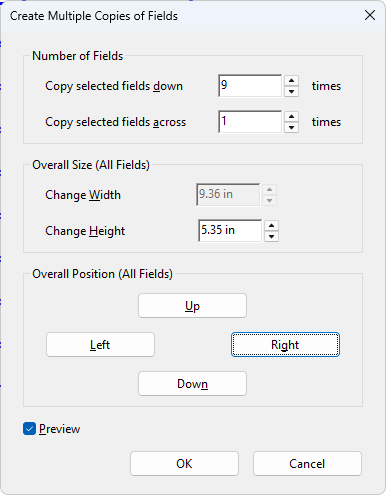
All field properties are copied except the rect (“rectangle”, or position on the page), and the field name. Field names are known in advance. A period and a numbering sequence is added to the created fields and the initial field is appended with a period and zero. So a field named Text becomes Text.0. If a number 1 is entered in the across field, so all the created fields are down, the appended numbers will go from 0 to 1 less than the number of fields. Example: 1 across and 10 down appends the fields with numbers from 0 to 9. The same thing happens if all the fields are across and only 1 is down. When you create both down and across fields, it gets a little more complicated.
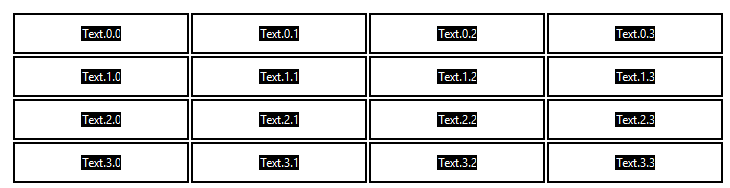
Using this method not only saves time, but also opens the door to several other benefits including:
The one-click calculation trick for summing multiple field values.
Changing the properties of all the fields with one line of JavaScript.
Entering one custom calculation script that works for every row.
Counting field attributes with a script.
Modifying field properties with a script.

I will describe all of these tricks on the coming weeks. Stay tuned…